Multi-Spindle Machining
Multi-Spindle Machining is used for the mass production of primarily turned parts that have some milled features. Instead of a single spindle, the machines used contain multiple spindles and produce multiple parts in parallel. At each spindle there may be any combination of end slides, OD slides (also known as cross slides), and slides with live tooling capabilities. The workpiece is indexed through each of the spindles in sequence, with different features machined at each index position. By the time the workpiece has indexed through all the spindles, the part is complete.
Multi-Spindle Machining involves level loading the features made and operations performed at each spindle, in order to minimize the overall part cycle time. That is, the goal is to distribute the various operations across the spindles so that the elapsed machining time at each spindle is as equal as possible. This can include performing multiple operations simultaneously on a single workpiece at a single spindle, using end slides and OD slides.
The operations performed at each slide are generally the same as the 3-Axis Lathe operations. Material cost and utilization are calculated as they are for the Stock Machining process group.
This process group is covered in the following sections:
Parts, Stock Forms, and Materials for Multi-Spindle Machining
Multi-spindle machining is typically used for small to medium sized parts. Outer diameters of 2 inches or less are typical. aPriori's Regional Data Libraries include machines that can accommodate stock diameters up to 90 millimeters (around 3.5 inches). (Some machines that are not included in the Regional Data Libraries can accommodate parts of up to around 200 millimeters or 8 inches.)
The cost model supports parts made from standard sizes of the following stock forms:
-
Square bar
-
Round Bar
-
Round Tube
-
Hex Bar
Material stock selection is the same as with Stock Machining. Material compositions and properties are the same as for Stock Machining. Material cost and utilization are calculated as they are for Stock Machining.
Multi-Spindle Machining does not support estimating secondary machining of parts made from a net-shape process such as casting or forging.
Lies Above Relation
The default assignment of operations to spindles is constrained by the order in which operations must be performed. If one operation, O1, needs to be performed before another operation, O2, then O1 cannot be assigned to a later spindle than O2. If an operation removes a volume of material that blocks access to a certain feature, that operation must be performed before the operation that creates the blocked feature. In this case the GCD representing that volume will bear the Lies Above relation to the GCD representing the blocked feature. The following figure of a part made from round bar stock illustrates lies above relations.
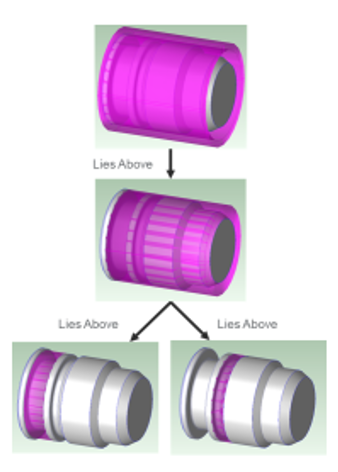
The top image shows that there is some stock allowance or extra margin around the OD. That OD margin needs to be machined away, to expose a second Ring of material which extends almost the entire axial length of the part. This second Ring GCD is displayed in the middle picture. Once that second Ring of material is machined away, we can access smaller Rings of material to be removed, with smaller ODs and axial extent, as shown in the bottom images.
Machines for Multi-Spindle Machining
Machines for the Multi-Spindle Machining process group are associated with the Simultaneous Turning process in the Machining process group. Information about Simultaneous Turning machines is contained in the following sections:
Machine Types for Simultaneous Turning
The aPriori Multi-Spindle Machining cost model supports only the following types of machines:
-
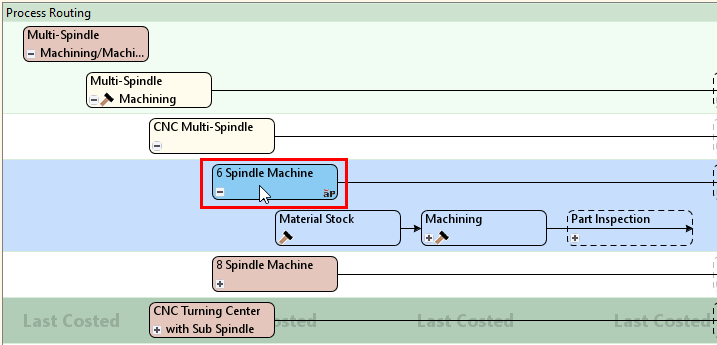
CNC Multi-Spindle machines: these typically have 6 or 8 spindles mounted on a rotating drum. Each partial rotation of the drum transfers each part from one spindle to the next. Completion of one part requires one complete rotation of the drum so that the part can be processed on every spindle.
-
CNC Turning Center machines with sub-spindle: these have two spindles and a mechanism for transferring parts from the first spindle to the second spindle.
Each spindle and its associated slides are generally assumed to support the capabilities of a 3-axis lathe.
The following machine types are not represented by the cost model at this time:
-
CAM Multi-Spindle machines (including use of Form tools)
-
Rotary Transfer machines
-
Swiss-Lathe machines
-
Any type of simultaneous milling machines
Slide Configuration for Simultaneous Turning Machines
At each spindle of a Multi-Spindle machine, there may be any combination of end slides, OD slides (also known as cross slides), and slides with live tooling capabilities. The following machine properties specify the machine's slide configuration:
-
Spindles With OD Slide: specifies which spindles have OD slides, and specifies how many OD slides those spindles have.
-
Spindles With End Slide: specifies which spindles have end slides, and specifies how many end slides those spindles have.
-
Spindles With Live Tooling: specifies which spindles have live tooling slides.
The value of each property is a comma-separated list of spindle numbers. If a spindle has two slides of a particular type (OD or End), its spindle number appears twice in a row in the slide list for that type.

The image above shows property values that specify:
-
Two OD slides on the first spindle and two OD slides on the second spindle
-
One end slide on the first spindle and one end slide on the second spindle
-
All the slides on the first spindle have live tooling, and all the slides on the second spindle have live tooling.

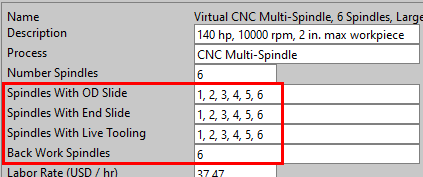
The image above shows property values that specify:
-
One OD slide on each spindle
-
One end slide on each spindle
-
Slides with live tooling on each spindle
Other Key Simultaneous Turning Machine Properties
Most properties of Multi-Spindle machines are just like those of the 3-Axis Lathe. Additional properties for Multi-Spindle machines include the slide configuration properties and the following properties:
-
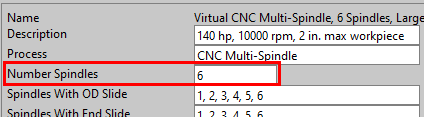
Number Spindles: number of spindles the machine has. This is generally 2, 6, or 8.
-
Back Work Spindles: spindles that support back work. The value must be a comma-separated list of spindle numbers. The cost model assumes that a part is swiveled to allow back work at most once. So, if the Back Work Spindles list has n values, these values must be the last n spindle numbers, in sequence with no gaps, ending in the value of Number Spindles.
-
Speed Synchronization Time: time in seconds to synchronize speeds before transferring a part to back work
-
Stock Feed Time: time in seconds to feed the stock into the machine, including time for collet opening and motor spool up time
-
Drum Index Time: default time in seconds to rotate the drum from one position to the next. Users can override the default on a per-part basis with the setup option Drum Index Cycle Time.
-
Transfer Time: time in seconds to transfer the part to back work or part ejection
-
Part Eject Time: time in seconds to eject the part
-
Tool Positioning Time: default time in seconds for the Tool Positioning operation to be performed. Users can override the default on a per-part basis with the setup option Tool Positioning Time.
-
Travel, Z Axis: tool's range of motion in millimeters along the machine's z-axis
Machine Selection for Simultaneous Turning
By default in starting point Digital Factories, the cost model follows these steps to select a machine:
-
Select the lowest-overhead, feasible, virtual machine, if there is one. If there is more than one lowest-overhead, feasible, virtual machine, select the smallest one, based first on the machine property Max Diameter and then, if necessary, on the machine property Max Length.
-
If there is no feasible virtual machine, select the Default machine, if it is feasible.
-
If the default machine is not feasible, select the lowest-overhead, feasible, non-virtual machine.
By setting preferVirtualMachines to false, administrators can override the default machine selection behavior and direct aPriori to prefer the default machine. In this case, machine selection follows these steps:
-
Select the Default machine, if it is feasible.
-
If the default machine is not feasible, select the lowest-overhead, feasible (virtual or non-virtual) machine.
Machine Feasibility for Simultaneous Turning
A machine is feasible only if it meets all the following requirements:
-
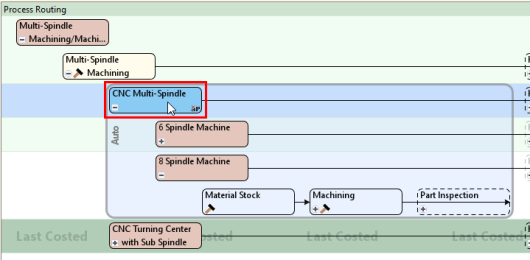
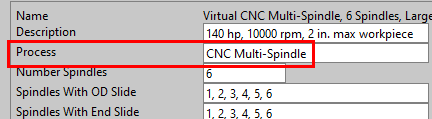
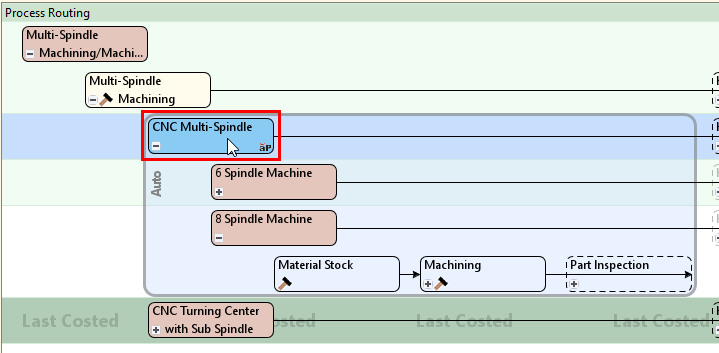
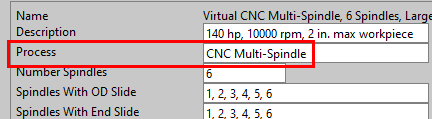
Machine type: If the current routing is a CNC Multi-Spindle routing, the machine property Process must have the value CNC Multi-Spindle; if the current routing is a CNC Turning Center with Sub Spindle routing, the machine property Process must have the value CNC Turning Center with Sub Spindle.
-
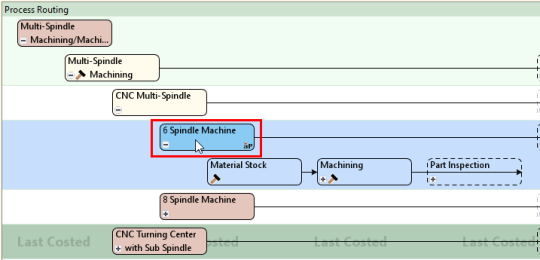
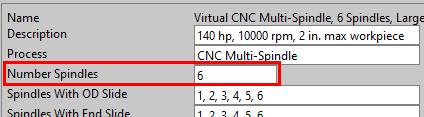
Number of spindles: Machine property Number Spindles must match the current routing type: 2 Spindle Machine routing, 6 Spindle Machine routing, or 8 Spindle Machine routing.
-
Spindle lists: The spindle lists must be valid. The values of the following properties are referred to as spindle lists:
-
Spindles With OD Slide
-
Spindles With End Slide
-
Spindles with Live Tooling
-
Back Work Spindles
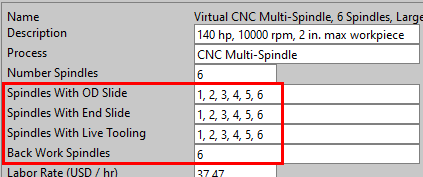
To be valid, each spindle list must meet the following requirements:
-
It is a non-empty, comma-separated lists of numeric values.
-
The number of values in the list does not exceed the value of the machine property Number Spindles.
-
The highest value in the list does not exceed the value of the machine property Number Spindles.
In addition, the back work configuration must be valid. The cost model assumes that a part is swiveled to allow back work at most once. So, if the Back Work Spindles list has n values, these values must be the last n spindle numbers, in sequence with no gaps, ending in the value of Number Spindles.
If the spindle lists are not valid, the machine is infeasible for any part.
-
-
Part size: the machine must be able to accommodate the part length and diameter:
-
The value of the machine property Max Length must be greater than or equal to the part Length.
-
The value of the machine property Max Diameter must be greater than or equal to the part's maximum turning diameter (the value of the Max Diameter property of the part's TurningAxis GCD).
-
-
Live tooling configuration: the machine must be configured for live tooling if the part has GCDs that require it.
A part requires live tooling if it has any of the following GCDs:
-
BulkRemoval
-
Keyway
-
SimpleHole that is not about a turning axis
-
Pocket
-
Polygon
-
Slot
A machine is configured for live tooling only if both the following hold:
-
The machine property Live Tooling Spindles lists at least one spindle.
-
The value of the machine property Live Tooling Spindle Power is greater than 0.
-
Processes, Operations, and Routing for Multi-Spindle Machining
This section covers the following topics:
Routing for Multi-Spindle Machining
For Multi-Spindle Machining, different machine types use different routings.
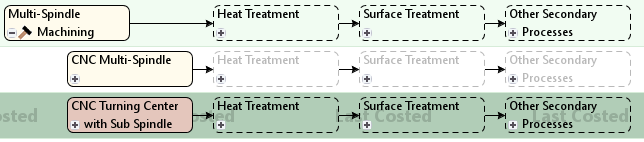
Routings include Material Stock from the primary process group (Multi-Spindle Machining) and Simultaneous Turning from the Machining process group:
-
Material Stock: from the Multi-Spindle Machining process group, this process serves as the locus of material stock selection and material cost calculations.
-
Simultaneous Turning: from the Machining process group, this process accounts for machine and tool selection, operation-GCD assignment, operation-slide assignment, and machining times and costs. See also Process Feasibility for Simultaneous Turning.
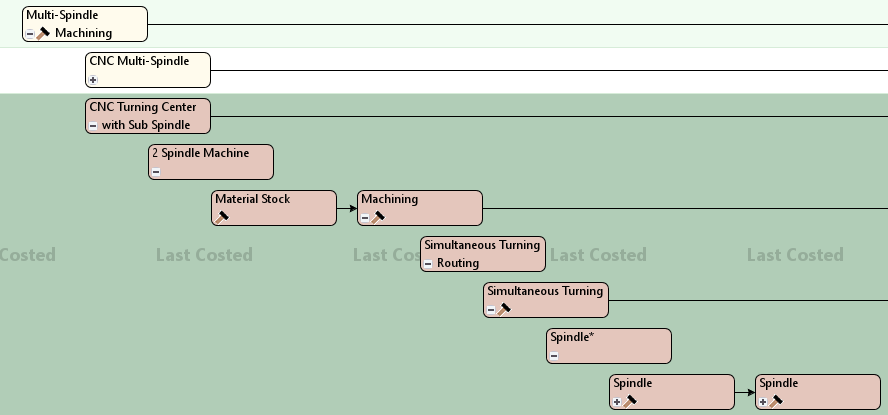
Manufacturing Process Hierarchy for Multi-Spindle Machining
In the Manufacturing Process pane, the Simultaneous Turning node displays a number in brackets ([2] in the example below) that indicates the number of spindles used in the routing. The Simultaneous Turning node has one child node for each spindle. Spindle nodes are labelled Spindle, Sindle:2, Spindle:3, and so forth.
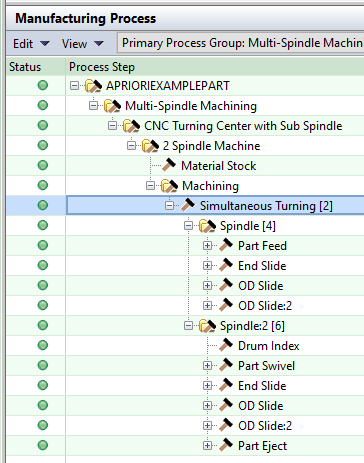
Each Spindle node displays a number in brackets ([4] and [6] in the example above) that indicates the number of slides and part manipulation streams associated with the spindle. (Certain part manipulation operations are not associated with a particular slide, and so they are displayed in separate nodes. These operations include Stock Feed, Drum Index, Transfer to Back Work, Transfer to Eject, and Part Eject.) Each Spindle node has one child node for each associated slide or part manipulation stream.
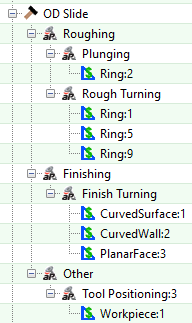
Each Slide node has one leaf-level descendant for each operation performed using that slide. The operations are grouped by operation type (such as Roughing) and operation subtype (such as Rough Turning). The operations generally have the same constraints and formulas as those defined for the 3-Axis Lathe.
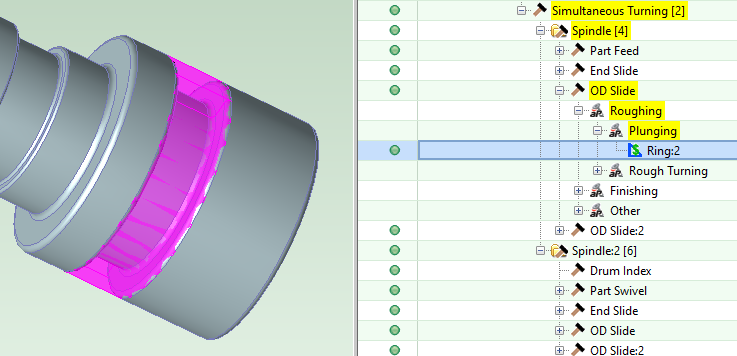
Example: The image below highlights Ring:2 in the Viewer and the Plunging operation on Ring:2 in the Manufacturing Process pane. This operation is performed with an OD Slide of the first Spindle.
Routings can include various processes from Heat Treatment, Surface Treatment, and Other Secondary Processes.
Process Feasibility for Simultaneous Turning
Simultaneous Turning is feasible only if all the following hold:
-
Current primary process group is Multi-Spindle Machining.
-
The stock is one of the following:
-
Square bar
-
Round Bar
-
Round Tube
-
Hex Bar
-
-
The part has exactly two turning axes, and those axes are parallel to one another and have opposite directions.
-
The part has no Axigoove GCDs.
Part Manipulation Operations
Part manipulation operations are performed on the Workpiece GCD, and include the following:
-
Stock Feed: this is always the first operation on the first spindle. The operation models feeding the stock into the machine. It is not assigned to a slide, but has a dedicated stream on the first spindle, as displayed in the Simultaneous Operation Viewer. It appears under the Part Feed node in the Manufacturing Process pane.
-
Drum Index: this is always the first operation on every spindle except for the first spindle. The operation models rotating the drum from one position to the next. It is not assigned to a slide, but has a dedicated stream on each spindle (except the first), as displayed in the Simultaneous Operation Viewer.
-
Tool Positioning: this is the first operation on any slide. The operation models positioning the tool on a given slide before performance of the other operations assigned to the slide. It appears under Other, under its slide node in the Manufacturing Process pane.
-
Parting: after Tool Positioning, this the first operation on an OD slide of either the first back work spindle or, if there is no back work, the last spindle. The operation models separating the part from the stock so it can be swiveled (for back work or eject). It appears under Roughing, under its slide node in the Manufacturing Process pane.
-
Transfer to Back Work: this operation occurs on the first back work spindle, after Drum Index (if present), Tool Positioning, and Parting, and before any other operations. The operation models swiveling the part to allow for back work. It is not assigned to a slide, but is part of an operation stream dedicated to swivel operations (Transfer to Back Work and Transfer to Eject), as displayed in the Simultaneous Operation Viewer. It appears under the Part Swivel node in the Manufacturing Process pane.
-
Transfer to Part Eject: this is the last operation before part eject on the last spindle, if the part has not already been swiveled for back work. The operation models swiveling the part to allow for part eject. It is not assigned to a slide, but is part of an operation stream dedicated to swivel operations (Transfer to Back Work and Transfer to Eject), as displayed in the Simultaneous Operation Viewer. It appears under the Part Swivel node in the Manufacturing Process pane.
-
Part Eject: this is the last operation on the last spindle. The operation models ejecting the part from the machine. It is not assigned to a slide, but has a dedicated stream on its spindle, as displayed in the Simultaneous Operation Viewer.
Operation Splitting
In order to help balance the load across spindles and lower overall part cycle time, aPriori sometimes splits certain operations with long cycle times into multiple operations which can be distributed across multiple spindles. Consider for example a part with a large hole that runs the entirety of the part's length. The cycle time to drill that hole may be significantly longer than that of any other operation on the part, and would drive elevated part cycle times if performed entirely on one spindle. To mitigate this issue, aPriori automatically splits some types of operations into multiple distinct operations which can be assigned to different spindles.
aPriori sometimes splits the following operations:
-
Rough Turning on a Ring GCD
-
Drilling in a SimpleHole GCD
-
Pecking on a SimpleHole GCD
Whether a Rough Turning operation on a Ring GCD is split depends on the ratio of the following two quantities:
-
Removed Ring volume
-
Total removed volume for the part
In starting point Digital Factories, the operation is split if this ratio is greater than or equal to 0.22.
Whether a Drilling or Pecking operation on a SimpleHole GCD is split depends on the ratio of the following two quantities:
-
Hole length
-
Part length
In starting point Digital Factories, the operation is split if this ratio is greater than or equal to 0.80.
Administrators can customize these thresholds with the lookup table tblMultiSpindleOpSplittingThresholds:
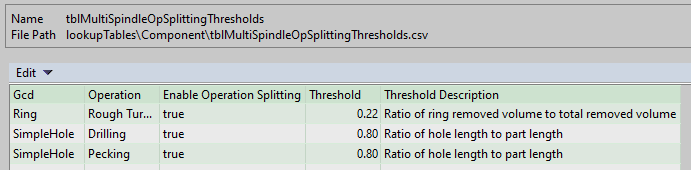
This lookup table also allows administrators to disable splitting for a given GCD type and operation.
If an operation is split, the number of operations into which it is split depends on the following:
-
GCD type: Ring or SimpleHole
-
Operation: Rough Turning, Drilling, or Pecking
-
Number of spindles on the selected machine: 2, 6, or 8
The lookup table tblMultiSpindleOpSplitting specifies the number of operations based on these parameters:
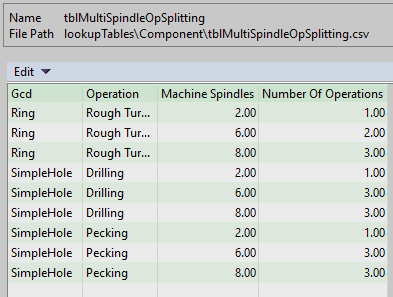
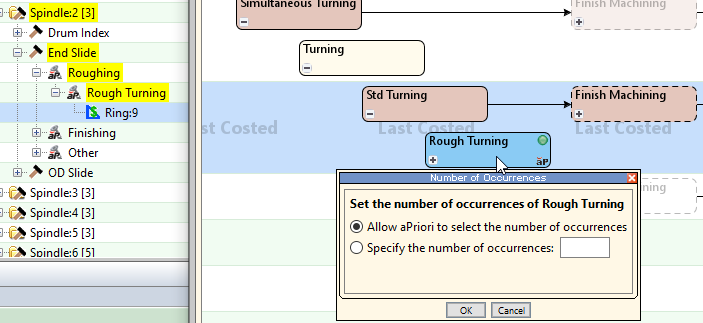
Users also can manually split operations. To do this, open the Operation Sequence Selection dialog for the operation's GCD, right-click the operation and select Number of Occurrences as shown in this figure:
Assignment of Operations to Slides
With multi-spindle machining, the operations required to manufacture a part are distributed across multiple spindles on a single machine, and the operations performed at a given spindle are distributed across multiple slides associated with that spindle. So, with a Multi-Spindle Machining part, after aPriori assigns operations to the part's GCDs, it places each operation on a particular slide associated with a particular spindle. By default, the order in which operations are assigned is based on the rank of each operation, and the slide to which an operation is assigned is based on the various slide scores for the operation. Operations are assigned in order of rank, from highest to lowest. Each operation is placed on the slide with the lowest score for that operation at that point in the assignment process.
In addition to reducing cycle time by performing operations on different spindles concurrently, multi-spindle machining reduces cycle time by performing some operations on the same spindle concurrently. For example, drilling on the front of the part can occur concurrently with OD rough turning, provided the feasible RPM ranges overlap. So when aPriori places an operation on a slide, it places it at specific location in the associated spindle's timeline, to allow aPriori to properly calculate cycle time, accounting for the cycle time savings realized from concurrency.
Users can override the default slide assignment for specific operations by assigning them manually to a slide.
Note: The default assignment and placement of operations for a given part is intended to provide a reasonable estimate of overall multi-spindle cycle time, accounting for the cycle time savings realized from concurrency; the assignments and placements might not be fully optimized and might not match the exact order and layout that would be chosen by someone programming a multi-spindle machine for the part.
More information is contained in the following subsections:
Rank
Operations, with certain exceptions, are assigned in order of rank, from highest to lowest. The rank of operation O is based on a mixture of two considerations:
-
Cycle time of O plus O's dependent cycle time, that is the cycle times of all operations that depend on O. The higher the sum of the cycle times, the higher the rank number.
-
Number of feasible spindles for O. The higher the number of feasible spindles, the lower the rank number.
An internal heuristic is used to combine these two considerations.
Certain part manipulation operations (on the Workpiece GCD) are placed on spindle timelines before all other operations: Stock Feed, Drum Index, Tool Positioning, Parting, and Transfer to Back Work.
If an operation has been manually assigned, its assignment is fixed at the start. (No operation has been manually assigned the first time the operations are assigned.)
Spindle Timelines and Operation Placement
When aPriori assigns an operation to a slide, it places the operation somewhere on the timeline for the slide's spindle. The final placement of operations on the timeline for each spindle is shown in the form of a Gantt chart in the Simultaneous Operation Viewer.
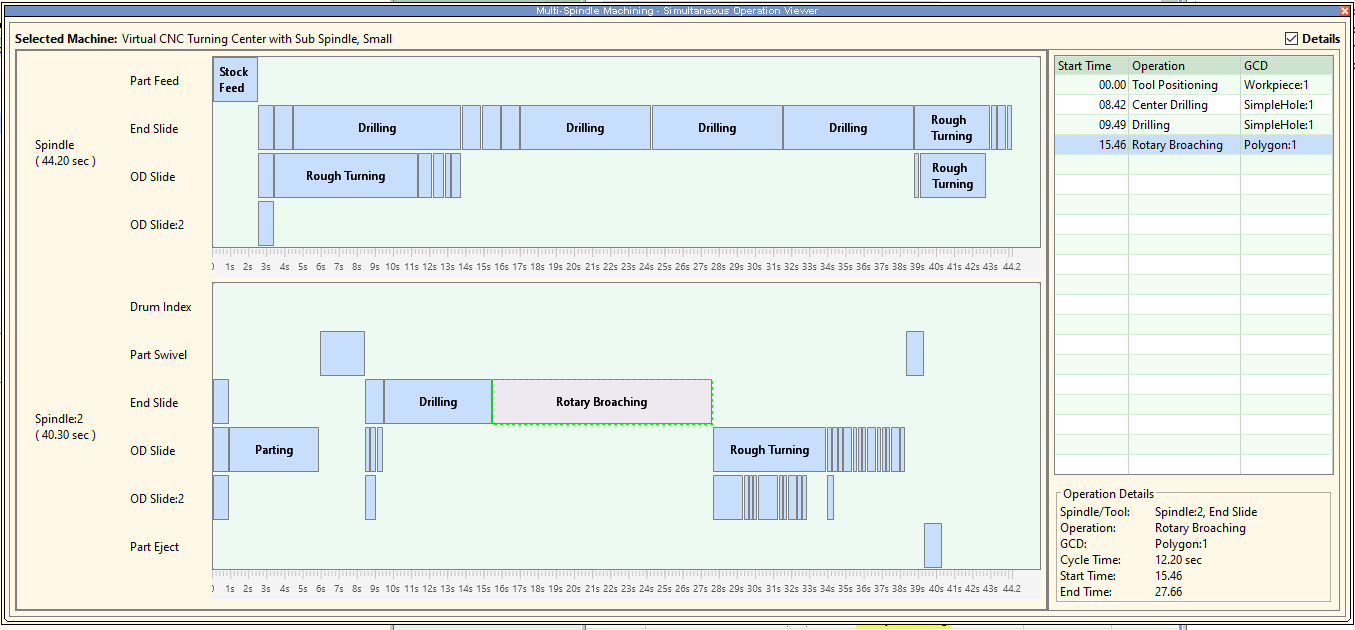
In the Operation Viewer, each operation is represented by a rectangle. The location of the rectangle along the vertical axis indicates the slide to which the corresponding operation is assigned. The location of the rectangle along the horizontal axis (the timeline) indicates the time at which the corresponding operation is performed relative to the other operations assigned to the same spindle. The length of the rectangle indicates the duration (cycle time) of the operation. Times on the timeline are specified as a number of seconds since the start of the spindle's first operation.
Placement of an operation on the timeline is guided by the precedence and compatibility constraints. In order to find an appropriate timeline location for an operation, O, aPriori first calculates O's cycle time. (Cycle times for individual operations are generally calculated as they are for operations of the 3-Axis Lathe in the Machining process group.) Next, aPriori does one of the following:
-
Places O at the earliest time on the timeline such that, with this placement, all the following hold:
-
O does not overlap with any operation that has already been placed on the same slide.
-
O does not overlap with any operation on another slide that, according to the compatibility constraints, is incompatible with O.
-
O is earlier than any operation on the same slide that, according to the precedence constraints, must be later than O.
-
O is later than any operation on the spindle that, according to the precedence constraints, must be earlier than O.
-
-
If the above placement is not possible (because there is no such time), aPriori places the operation after the latest operation on the spindle that, according to the precedence rules, must be earlier than O. Then aPriori shifts all later operations on the same slide to even later timeline locations so that no operations overlap.
Finally, as necessary, aPriori shifts later operations on any slide to even later timeline locations so that the overall placement of operations on the spindle satisfies the precedence and compatibility constraints.
Score
Operations are assigned in order of rank, from highest to lowest. By default, each operation is placed on the slide with the lowest score for that operation at that point in the assignment process. In order to determine which slide to place an operation on, aPriori considers candidate placements of the operation on the feasible slides of all feasible spindles, in order to arrive at slide scores.
The score of slide S for operation O depends on the following:
-
Total cycle time for S's spindle assuming the spindle has the operations that are already assigned to it as well as O. The higher this cycle time, the higher the score.
-
Fraction, F, of total downstream available cycle time that would be taken up by O’s dependent cycle time. F is the ratio of the following:
-
O's dependent cycle time.
-
Total available cycle time on S and all spindles downstream from S
The larger the fraction, the higher the score.
-
The cost model uses the following formulas:
Score = Cycle Time + (F * Target Cycle Time)
F = Dependent Cycle Time / (S's Available Cycle Time + Downstream Available Cycle Time)
Available Cycle Time on a Given Spindle
Available cycle time is a quantity that is used during the assignment of operations to slides. Available cycle time on a given spindle is 0 if the cycle time already assigned to the spindle exceeds the target cycle time. Otherwise, it is the target cycle time minus the cycle time already assigned to the spindle.
Target Cycle Time
Target cycle time is a quantity that is used during the assignment of operations to slides. This is the cycle time that results from a perfectly balanced assignment of operations to spindles, assuming serial execution of all the operations on a given spindle. It is the sum of the cycle times for all operations divided by the number of spindles, bounded below by the longest single cycle time.
Target Cycle Time = Max(Sum of Operation Cycle Times / Number of Spindles, Longest Operation Cycle Time)
Dependent Operations
Operation O2 depends on operation O1 if O1 must be performed before O2 according to the operation precedence rules.
Dependent Cycle Time
The dependent cycle time of O is the sum of the cycle times of all operations that depend on O.
Spindle Feasibility
Following are the requirements on spindle feasibility:
-
When the current machine has n spindles for back work, only the last n spindles are feasible for back work; moreover, the last n spindles are not feasible for front work.
-
Back work spindles are not feasible for operations on a feature that is too close to the front of the part, because the feature will be covered by the tool holder once the part is swiveled for back work. In starting point Digital Factories, a feature is considered too close if its distance from the front is less than 1/4 of the part length along the turning axis. Administrators can customize this fraction of part length with the cost model variable toolHolderLengthFactor (0.25 in starting point Digital Factories) in the Machining process group.
-
A spindle is feasible for an operation only if the spindle has a slide that is feasible for the operation.
Slide Feasibility
Slide L is feasible for operation O only if both the following hold:
-
L provides appropriate access to the GCD for O, given L's slide type (OD versus End, live tooling versus no live tooling) and spindle type (front work versus back work).
-
O can be placed on L without violating the precedence and compatibility constraints.
Operation Precedence
Operation precedence rules specify, for any pair of operations, whether one must be performed before the other. This constrains operation-spindle assignment as follows: If operation O1 must be performed before operation O2, then O1 cannot be assigned to a later spindle than the spindle to which O2 is assigned.
Operation precedence also constrains the ordering of operations on a given spindle. If operation O1 must be performed before operation O2, then O1 will appear before O2 on the spindle's timeline.
Following are the precedence rules:
-
Part Eject must be later than any other operation.
-
Stock Feed must be earlier than any other operation.
-
Parting must be earlier than Transfer to Back Work and Transfer to Part Eject.
-
Transfer to Part Eject must be earlier than Part Eject.
-
A roughing operation on a GCD must be earlier than any finishing operation on that GCD.
-
Center Drilling on a hole GCD must be earlier than any other operation on that GCD.
-
A hole-making operation on a GCD must be earlier than any edge treatment operation (such as a chamfering or rounding operation) on that GCD.
-
Both Drilling and Pecking must be earlier than Counterboring.
-
Threading on a GCD (a SimpleHole or CurvedWall) must be later than any other operation on that GCD.
-
If a SimpleHole is a child of a RingedHole, the SimpleHole's operation must be earlier than any operation on another child GCD of the RingedHoleGCD. In other words, the SimpleHole of a RingedHole is created first, before the creation of the RingedHole's Ring(s).
-
For operations on the child GCDs of a ring, operations that have the same setup axis are performed in order from the front of the part to the back.
-
An operation on a GCD that has child GCDs must be earlier than any operation on any of those child GCDs.
-
If a GCD, G1, Lies Above Relation another GCD, G2, the operation on G1 must be earlier than the operation on G2, with certain exceptions, noted below.
Exceptions: The Lies Above relation does not constrain operation order in the following cases:
-
If G1 is a StockTrim and G2 is a BulkRemoval or another StockTrim.
-
If G1 is a StockTrim on the back of the part and one of the following holds:
-
G2 is an OD-accessible Pocket, Ring, Slot, or Keyway.
-
G2 is a through SimpleHole.
-
-
G1 is a Ring and G2 is BulkRemoval
-
G1 is a Ring child of a StockTrim and G2 is an ID-accessible Ring child of a StockTrim.
-
G1 is a ring on the back of the part and one of the following holds:
-
G2 is an OD-accessible Pocket, Ring, Slot, or Keyway.
-
G2 is a through SimpleHole.
-
G2 is an CurvedWall that is either OD-accessible or accessible from both front and back.
-
Operation Compatibility
Operation compatibility rules constrain the placement of operations on spindle timelines.
-
Any operation that can only be performed while the workpiece is stationary (that is, while the workpiece is not turning) is incompatible with any operation that requires the workpiece to be turning.
-
Two turning (non-live-tooling) operations are compatible only if their feasible RPM ranges overlap.
-
Every part manipulation operation except Tool Positioning is incompatible with any other operation.
Feasible RPM Ranges
Two turning (non-live-tooling) operations, O1 and O2, are compatible only if their feasible RPM ranges overlap. The determination is made based on the following quantities:
-
RPM-1, the workpiece RPM for operation O1 based on the operation's adjusted speed and on workpiece diameter.
-
RPM-2, the workpiece RPM for operation O2 based on the operation's adjusted speed and on workpiece diameter.
-
RPM-Avg, the average of RPM1 and RPM2.
In starting point Digital Factories, the feasible RPM ranges for O1 and O2 are considered to overlap if RPM-1 and RPM-2 are both within 10% of RPM-Avg. Administrators can customize this percentage with the cost model variable spindleRPMPercentageDifferenceLimit (10 in starting point Digital Factories) in the Machining process group.
Changing Operations-Slide Assignments
You can override aPriori's default assignment of operations to slides, and manually assign individual operations.
To manually re-assign an operation follow these steps:
-
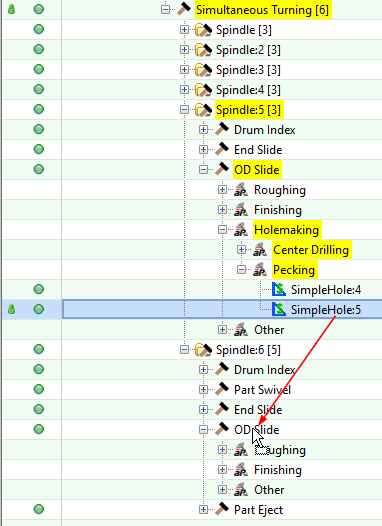
In the Manufacturing Process pane, drag the operation's GCD to the slide that you want to assign the operation to. Release the mouse button when the cursor is positioned over the desired slide node.
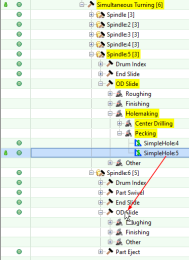
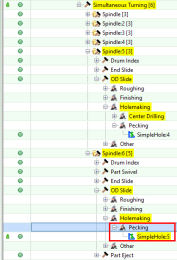
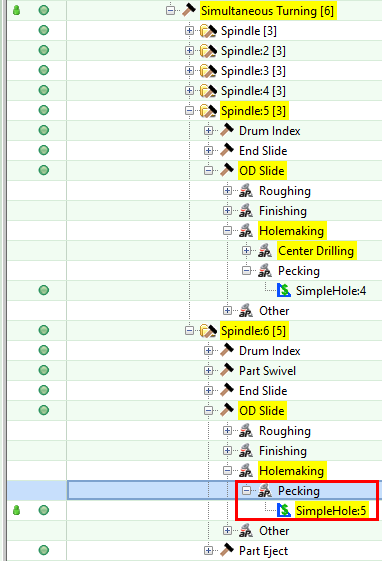
In the example shown in the images below, the default assignment assigned Pecking on SimpleHole:5 to the OD slide of Spindle:5. When SimpleHole:5 is dragged to the OD slide of Spindle:6, aPriori re-assigns Pecking on SimpleHole:5, as shown in the second image.
aPriori places the operation under the appropriate child node of the target slide node.
-
Re-cost the part to recalculate cycle time impact and update the Simultaneous Operation Viewer.
By default, only the operation that is manually reassigned is moved to a new slide. However, you can override the default behavior, and direct aPriori to automatically reassign operations (other than the manually-assigned ones) to attempt to improve load balancing and to ensure that all operations adhere to the precedence and compatibility constraints.
To direct aPriori to automatically re-assign non-manually-assigned operations, set the process setup option Method Used to Rebalance Operations After Override to Rebalance Operations After Override, and re-cost the part. Note that costing fails if the automatic assignment procedure cannot find an assignment that adheres to the precedence and compatibility constraints.
Note: aPriori does not prevent invalid manual assignments. For example, aPriori does not prevent you from manually assigning Pecking to an earlier spindle than Center Drilling on the same GCD. Similarly, aPriori does not prevent you from assigning an operation to an OD slide, for example, when the operation actually requires an End Slide. aPriori neither prevents nor warns about invalid manual assignments. If you do not set the setup option Method Used to Rebalance Operations After Override to Rebalance Operations After Override, it is your responsibility to ensure that any manually-assigned operation assignments are valid.
Note: You cannot drag and drop operations in the Simultaneous Operations Viewer.
Cycle Time and Labor Time for Multi-Spindle Machining
The cycle time for the Simultaneous Turning process is the largest cycle time among the spindle cycle times. (As with other process groups, administrators can adjust this value with the cost model variable cycleTimeAdjustmentFactor in the Machining process group.)
The cycle time for a given spindle is the end time of the latest operation on the spindle's timeline. Cycle times for individual operations are generally calculated as they are for operations of the 3-Axis Lathe in the Machining process group.
Note that tool replacement time is accounted for through its impact on machine up time. That is, the value of the machine property Machine Uptime Percent takes into account tool replacement time.
In starting point Digital Factories:
-
Number of operators for CNC Multi-Spindle machines is set to 0.25, so labor time is one quarter of cycle time.
-
Number of operators for CNC Turning Center machines is set to 0.5, so labor time is half of cycle time.
Setup Options for Multi-Spindle Machining
Process Setup Options are described in the following sections:
The Machining node options are described in Machining Node Process Setup Options.
The Material Stock node options are the same as those described in the section Material Stock Setup Options for Stock Machining, except that the related cost model variables are defined in Multi-Spindle Machining rather than Stock Machining. Setup options related to plate stock do not apply to Multi-Spindle Machining.
Setup Options for an individual operation are generally like those for the 3-Axis Lathe operation with the same name.
Multi-Spindle Machining Node Setup Options
The Multi-Spindle Machining node in the Process Options Editor provides the following options:
Enable Scrap Material Credit
By default in starting point Digital Factories, the cost model assumes that material scrap (for example, trim scrap) is not sold for credit. Administrators can customize the default with the cost model variable enableScrapMaterialCredit (false in starting point Digital Factories) in the Multi-Spindle Machining process group. With this setup option, users can override the default on a per-part basis.
Enabling scrap material credit increases material utilization and decreases material cost. The credit rate is specified as a percentage of the material rate by the material property Scrap Cost Percent.
Enable Scrap Part Credit
By default in starting point Digital Factories, the cost model assumes that the material from scrapped parts is not sold for credit. Administrators can customize the default with the cost model variable enableScrapPartCredit (false in starting point Digital Factories) in the Multi-Spindle Machining process group. With this setup option, users can override the default on a per-part basis.
Enabling scrap part credit increases material utilization and decreases material cost. This includes credit for parts scrapped by this process as well as by downstream processes. The credit rate is specified as a percentage of the material rate by the material property Scrap Cost Percent.
Simultaneous Turning Setup Options
Many of the process setup options provided by the Simultaneous Turning process are the same as those described in the section Machining Process-level Options. Simultaneous Turning also provides the following options:
Front of Part
Generally, mutli-spindle machines have more spindles designed for front work than back work, and the cost model assumes that this is true of the selected machine. So, by default, the cost model chooses the front of the part based on an internal heuristic designed to identify the side who's features will take the longest (and so require more spindles to balance the load).
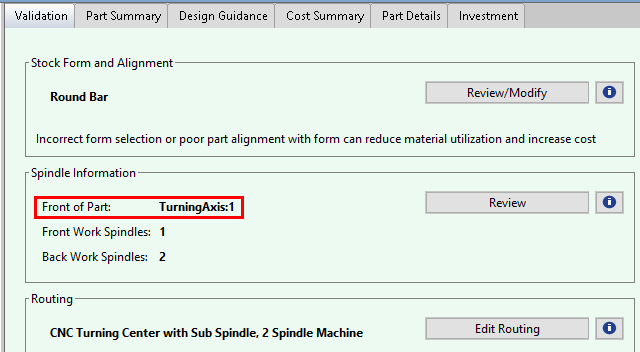
The Validation tab displays the TurningAxis associated with the front of the part.
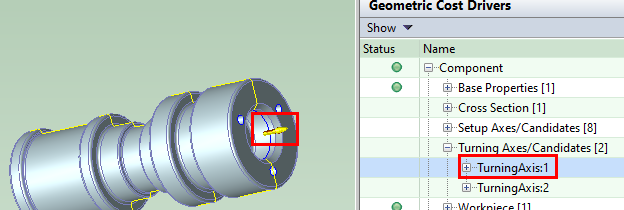
If you select that TurningAxis in the Geometric Cost Driver pane, the Viewer displays, near the front of the part, an arrow pointing away from the front.
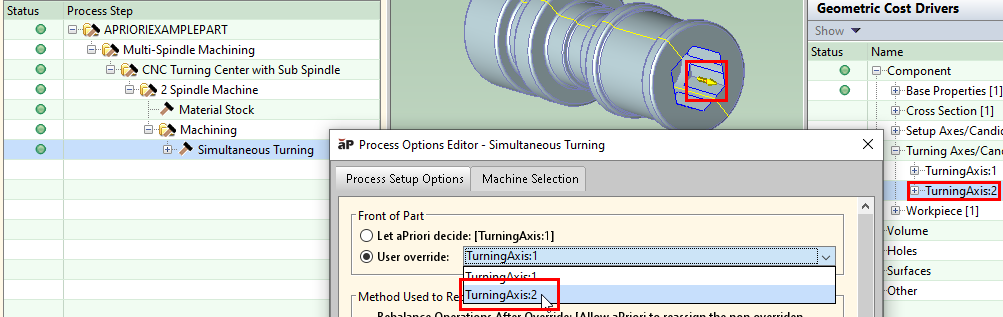
You can override the default choice of part front with the setup option Front of Part (provided by the Simultaneous Turning node of the Process Options Editor).
The optimal choice of turning axis is generally the one that results in a more balanced load, that is, a more even distribution of operation cycle times across spindles. This increases concurrency and reduces overall cycle time. Choosing the wrong turning axis can increase cycle time, increasing labor and overhead costs.
Method Used to Rebalance After Override
You can override aPriori's assignment of operations to slides and manually re-assign operations. By default, next time you cost the part, aPriori does not change any operation-slide assignments other than the manually re-assigned ones. Note that in this case, with the manual re-assignments, the operation-slide assignment might not satisfy the precedence and compatibility requirements.
You can override the default behavior with the setup option Method Used to Rebalance After Override (provided by the Simultaneous Turning node of the Process Options Editor). If you set the setup option to Rebalance Operations After Override and re-cost the part, aPriori will modify the operation-spindle assignments to satisfy the precedence and compatibility requirements and balance the cycle times. Costing fails if the automatic assignment procedure cannot find an assignment that adheres to the precedence and compatibility constraints.
Drum Index Cycle Time
Each Drum Index operation (on the Workpiece GCD) accounts for the time required for the machine drum to rotate, in order to position each part at the next spindle. By default, the required time is specified by the machine property Drum Index Time. You can override the default on a per-part basis and specify the required time with the setup option Drum Index Cycle Time (provided by the Simultaneous Turning node of the Process Options Editor).
Tool Positioning Time
Each Tool Positioning operation (on the Workpiece GCD) accounts for the time required to position a spindle's slides at the beginning of a cycle. By default, the required time is specified by the machine property Tool Positioning Time. You can override the default on a per-part basis and specify the required time with the setup option Tool Positioning Time (provided by the Simultaneous Turning node of the Process Options Editor).
Spindle Node Setup Options
The Spindle nodes in the Process Options Editor provide the following setup options:
Fixture Cost
By default the fixture cost for a given spindle is the product of the following:
-
Fixture build time
-
Fixture build cost per unit time, based on machine labor rate, direct overhead rate, and indirect overhead rate.
aPriori estimates fixture build time based on the following:
-
Number of tools used at the spindle
-
Whether a perimeter cutting operation is performed at the spindle
If a perimeter cutting operation is present, aPriori increases the fixture build time by a factor of 1.25 in starting point Digital Factories. Administrators can customize this factor with the cost model variable fixtureTimeAdjustmentForPerimeterMilling in the Machining process group.
Users can override the default fixture cost on a per part basis with the setup option Fixture Cost (provided by the Spindle node of the Process Options Editor).
Fixture cost contributes to Capital Investment.
Hard Tooling Cost
By default, hard tooling cost is 0. Users can specify hard tooling cost on a per part basis with the setup option Hard Tooling Cost (provided by the Spindle node of the Process Options Editor).
Hard tooling cost contributes to Capital Investment.
Simultaneous Operation Viewer
The Simultaneous Operation Viewer provides a graphical display of the available spindles and slides and the features and operations assigned to each of these. This allows you to easily assess when and where various operations are occurring.
For example, the part shown below has been evaluated and assigned to a CNC Multi-Spindle class machine with 6 spindles. Click the Simultaneous Operation Viewer button in the aPriori Professional toolbar to launch the Simultaneously Operation Viewer.
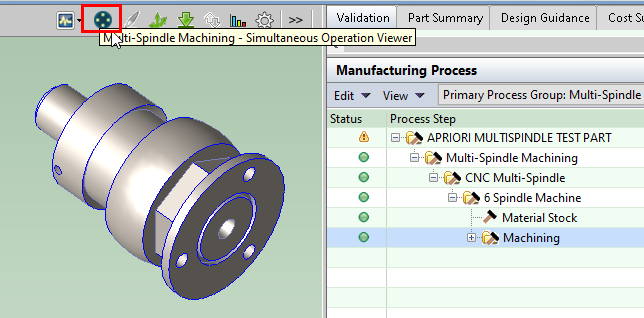
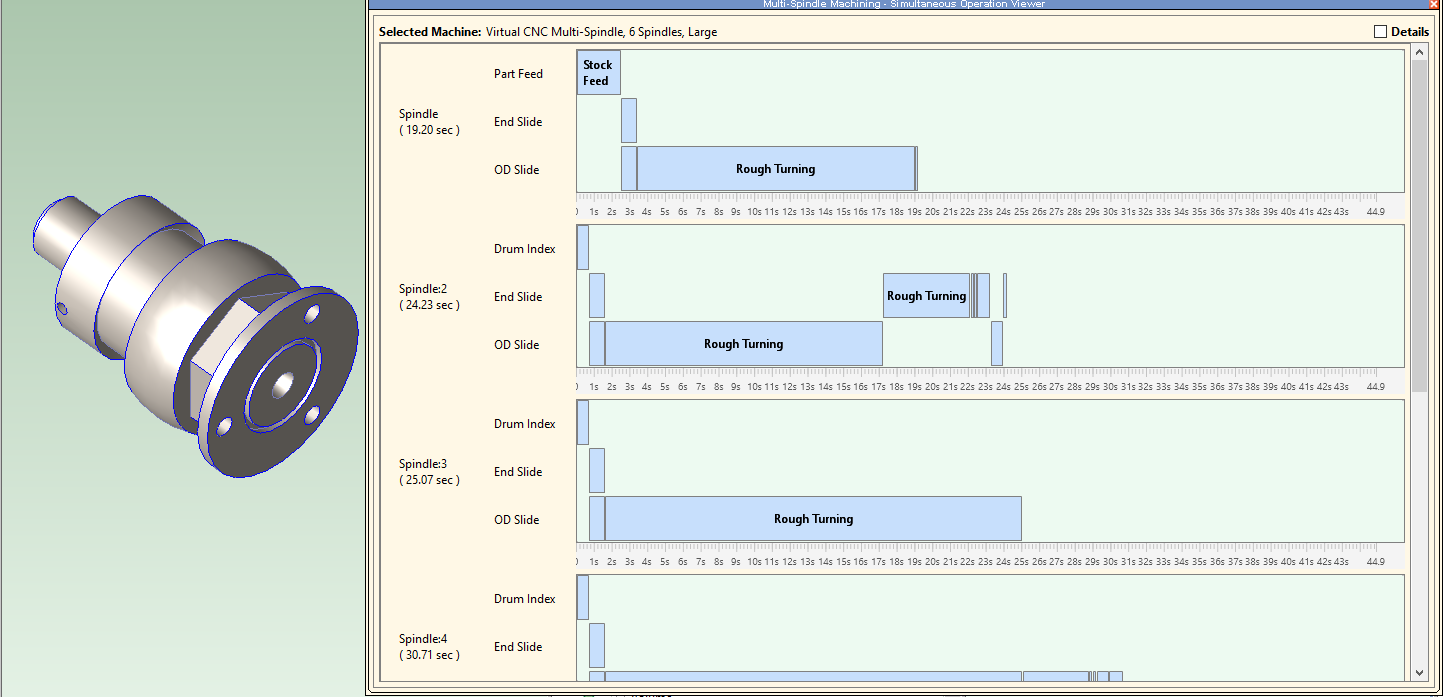
There is a green row for each Spindle. Within the green row for a given spindle, there is a blue row for each slide associated with that spindle. The blue row for a given slide is broken into segments that each depict an operation that occurs on that slide. The blue rows function like rows of a Gannt Chart, showing the sequencing and duration of operations.
You can display the Details pane by checking the Details check box in the upper right corner of the Simultaneous Operation Viewer. You can click an element within each blue row, such as the Pecking operation in the picture above. Selecting an element highlights the relevant GCD in the Viewer and also in the Details pane at the right of the dialog. This Details pane displays a sequential list of all operations occurring on a given slide at a given spindle.
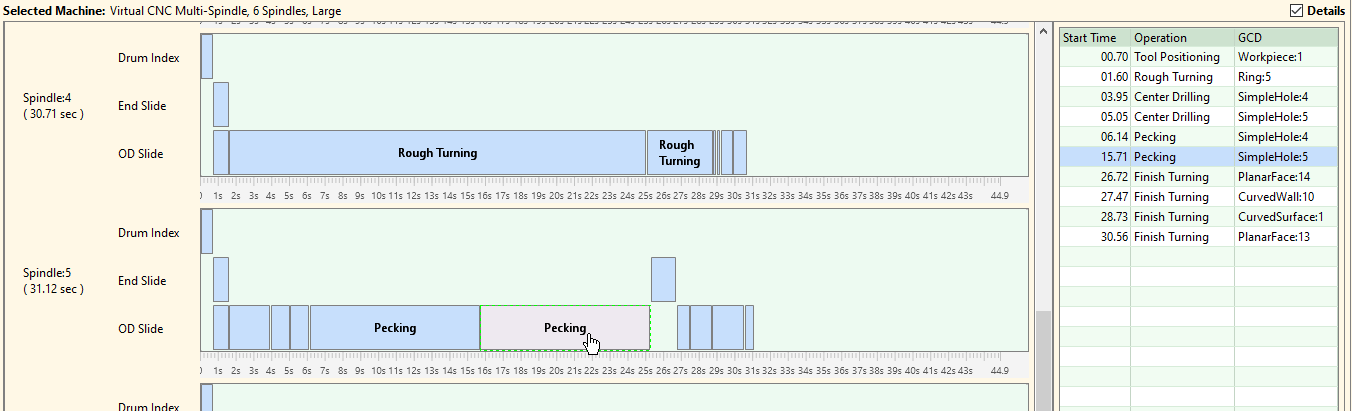
The Details View makes it easier to review operations that are very short in duration and may be hard to distinguish in the Gannt-style view. Selecting a row in the Details pane also highlights the relevant GCD in the Viewer and in the Gannt-style view.
Limitations for Multi-Spindle Machining
The Multi-Spindle Machining group currently has the following limitations:
-
No support for form tools and CAM multi-spindle machines: Form tools are custom-designed tools with a cutting profile in the inverse shape of the geometry to be turned. These are moved (plunged) into the workpiece in the axial direction. Typically, these are designed to machine some length of the turning profile simultaneously, thereby reducing cycle time compare to single-point turning operations. aPriori does not determine which GCDs could potentially be machined with a common form tool, so it assumes only single-point turning. CAM multi-spindle machines frequently rely on the use of form tools because these machines cannot move radially and axially simultaneously. Therefore, CAM Multi-Spindle machines also are not supported.
-
Slide configuration is manually specified rather than automatically optimized: aPriori does not determine an optimal configuration of OD Slides and End Slides for making a given part; instead, machines with different slide configurations are defined in the Digital Factor and aPriori evaluates the part with respect to those machine configurations.
-
No support for "double drop" machine configurations: aPriori assumes that all available spindles are used to make the features of a single part. There is no support for "double drop" capabilities, for example configuring an 8-spindle machine to behave as two 4-spindle machines in which a single workpiece is processed on only 4 of the spindles.
-
Limited design guidance: The Multi-Spindle Machining process group does not currently flag Design for Manufacturability or Design to Cost issues.